
Event Driven Architecture 101
Guide to Async Programming
Ever waited in a long line to get your work done? You can't do anything until your turn comes. That's synchronous in real life — and it applies to programming too.
In synchronous programming, each block of code must wait for the previous one to finish before moving on. This can become slow, inefficient, and frustrating.
The Old Synchronous Way
Let's look at a real-world analogy: ordering food at a restaurant.
Suppose you're a waiter, and this is how you operate:
- You take an order from Table 1
- You go to the kitchen and wait until it's fully cooked
- You serve it
- Only then do you go to Table 2 to repeat the same steps
- Then move to Table 3, and so on
Problems:
- Every table must wait for the previous one
- Long waiting times
- Poor customer experience
- You're not using your time efficiently
This is exactly what synchronous code does — it waits at each step.
The Better Asynchronous Way
Now let's imagine a more efficient restaurant flow:
- You take an order from Table 1 and pass it to the kitchen
- While it's being cooked, you immediately take an order from Table 2
- Then Table 3, and so on
- As soon as a dish is ready, you serve it — regardless of table order
Benefits:
- Orders are processed in parallel
- No table has to wait for others to finish
- You're doing more in less time
- Much smoother experience
Let's See in Context of Programming: How Async Helps in Real Code
Suppose you're building a notification service that sends a confirmation email to each user after they sign up. Now imagine 100 users sign up at the same time.
Assumptions:
- You need to send emails to 100 users
- Sending one email takes 2 seconds (due to network delay)
Doing it the Synchronous Way
function sendEmails(users) {
  for (let user of users) {
    sendEmail(user.email); // Wait until this email is sent
  }
}
Problems with This Approach:
- • Sends one email at a time
- • Each email takes ~2 seconds
- • 100 users = 100 × 2 = 200 seconds total
- • If one email fails or gets stuck, others are delayed
- • Slow and not scalable
Let's Optimize It with Async
async function sendEmails(users) {
  const promises = users.map((user) => sendEmailAsync(user.email));
  await Promise.all(promises);
}
Benefits of This Approach:
- All emails are sent in parallel
- Total time drops from 200 seconds to around 2–3 seconds
- Much faster and more efficient
- Scalable for thousands of users
Async in Real Life: Beyond Promises
So far, we've seen how async/await and Promise.all() help us run tasks in parallel in code. That works perfectly for small-scale tasks, like sending a few emails or loading UI data in a browser.
But what about real-world systems with:
- Thousands of users
- Millions of events
- Long-running operations
- The need for retries, persistence, and monitoring
At scale, promises alone aren't enough to handle real-world async processing needs. Instead, we use infrastructure-level patterns to handle this complexity — patterns built to decouple, scale, and reliably process massive volumes of async tasks.
Let's see some common patterns used in real-world backend systems:
1. Message Queues
Message queues are like buffers or queue that sit between two parts of your system — a producer (which creates tasks) and a consumer/worker (which performs those tasks).
They act as a connection point for multiple services. One service produces tasks in the queue and other services consume them at their own pace.
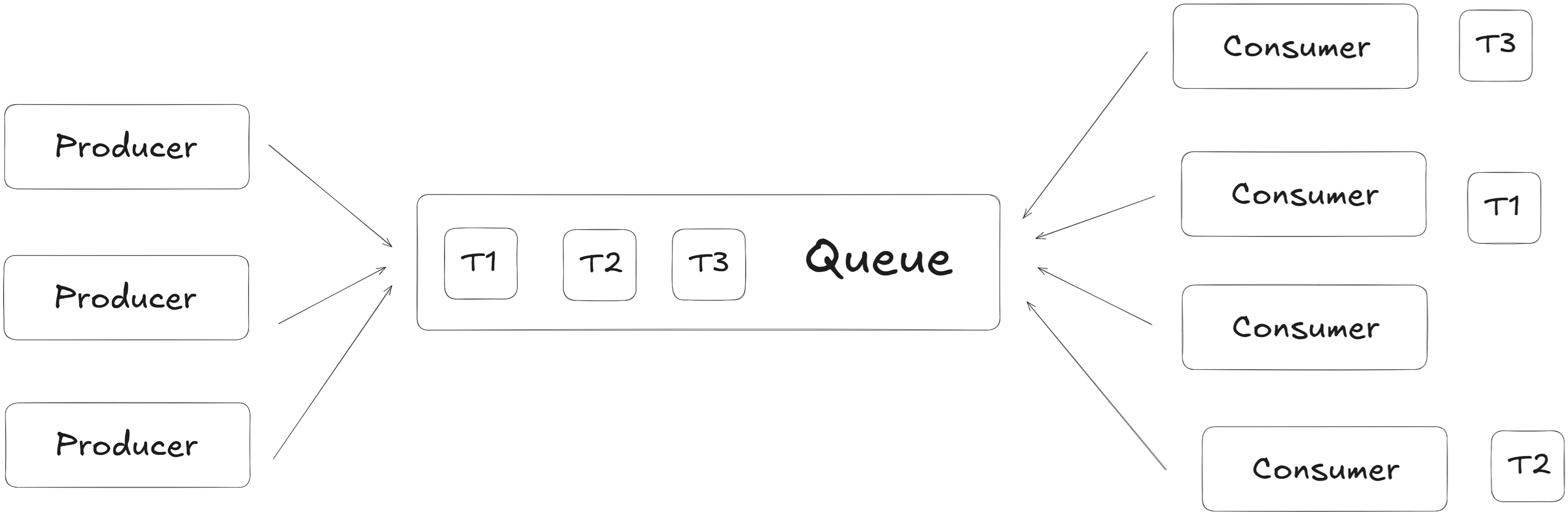
How Message Queues Help in Async Programming:
- Decouple components — The API doesn't wait for task completion
- Scale easily — Add more workers to process tasks faster
- Retry failed jobs automatically
- Persist tasks — Messages can be kept for hours/days if needed
- Monitor jobs — Track what failed/succeeded
Example: Async Code Compilation (like LeetCode)
Imagine a user submits some C++ code to your coding platform:
- The API receives the code and quickly pushes a task like
Compile user123's codeinto a message queue. - A background worker picks up the task, compiles the code, and updates the result in the DB.
- The user can check the result via job ID — without waiting.
Benefits:
- Non-blocking: API responds instantly — no delay for users
- Parallelism: Multiple workers can process multiple jobs at once
- Resilience: Failed jobs can be retried automatically
- Durability: Tasks stay in queue even if services restart
2. Message Streams
Message Streams are used when data keeps flowing — not just one-time tasks, but continuous updates.
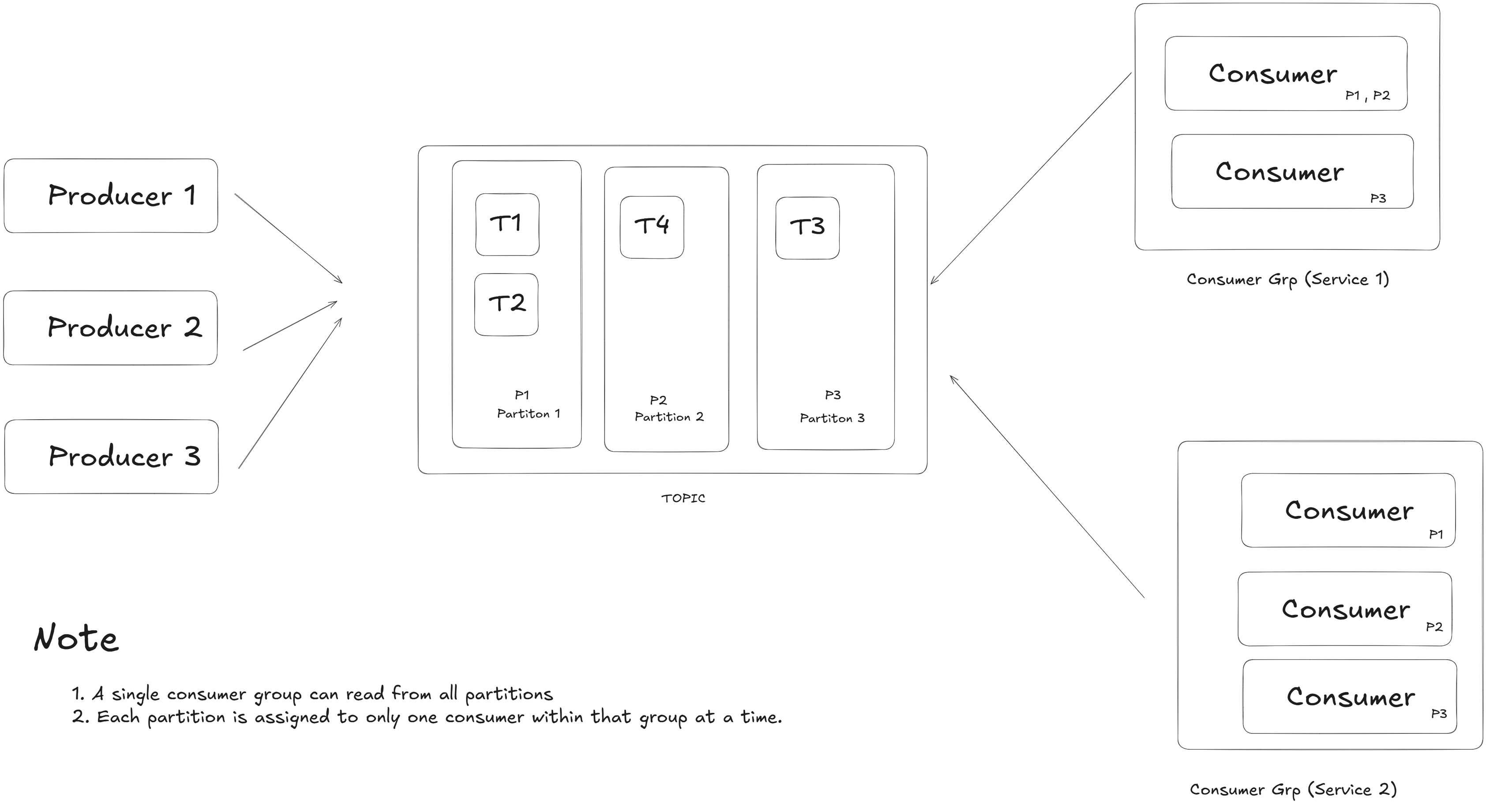
Unlike message queues (1 producer → 1 consumer per message), message streams allow multiple producer → multiple consumer groups, where each group receives all messages independently. They're perfect when many services need to react to the same stream of events — like location updates, order events, or sensor data. Examples: Kafka, Kinesis.
When to Use Message Streams:
- When you have real-time data
- When multiple services need the same info
- When services must work independently, without waiting
Think of it like a live broadcast — one source, many listeners.
Example: Uber Driver Location Streaming
In a service like Uber, every driver's app sends live GPS coordinates every few seconds.
{
  "driverId": "DR123",
  "lat": 28.6139,
  "lng": 77.209,
  "timestamp": 1690917600
}
These updates are pushed to a Kafka topic called driver-location-stream.
| Service | What It Does |
|---|---|
| Nearby Driver Service | Shows drivers near a passenger |
| ETA Service | Continuously updates arrival times |
| Analytics | Tracks hotspots and trends |
| Fraud Detection | Detects fake GPS or route anomalies |
Each service has its own consumer group. All groups receive every message independently, allowing their logic to stay isolated and process asynchronously. Within each group, messages are distributed among consumers for parallel processing.
How Kafka Distributes Work:
If a topic has 3 partitions (P0, P1, P2) and a consumer group has 3 consumers, each consumer gets one partition. If there are fewer consumers than partitions, some consumers handle multiple partitions. This ensures parallel processing while maintaining message order within each partition.
Message Stream Benefits:
- Write once, used by many services
- Real-time, scalable, and resilient
- Each group processes data independently
- Supports message replay (by offset)
- Built-in fault tolerance and parallelism
3. Pub/Sub (Publish-Subscribe)
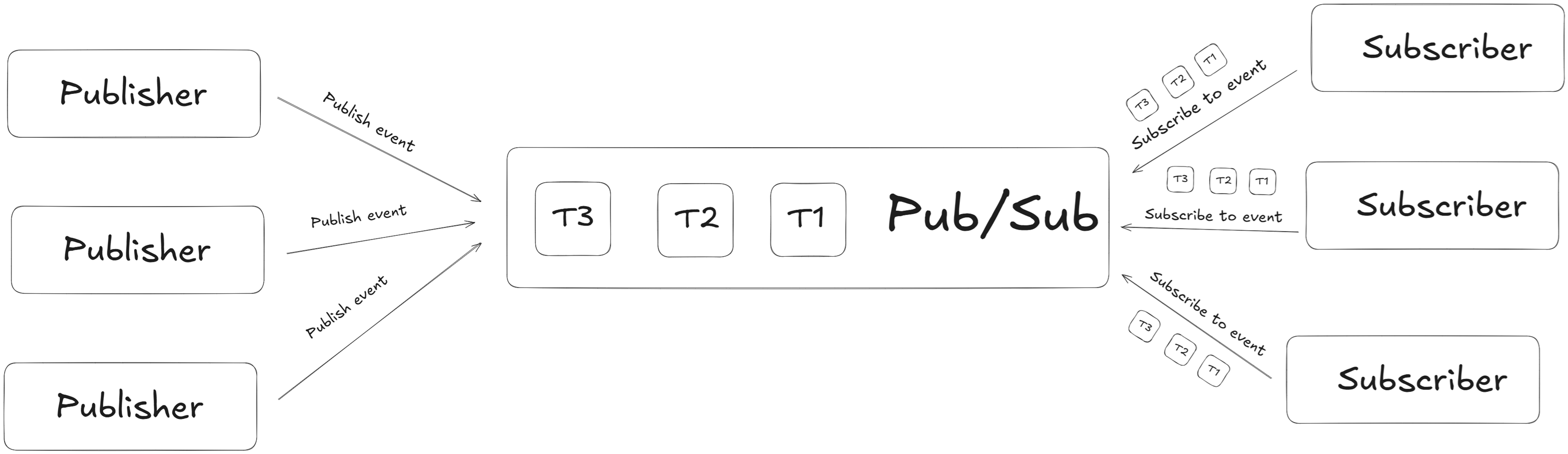
In our journey through asynchronous processing, we've seen howmessage queues offer reliable task delegation and how message streams help process flowing data across consumers. But when it comes to real-time event delivery — think of notifications, live updates, or collaborative apps — the Publish-Subscribe (Pub/Sub) model shines.
Key Characteristics:
- Fire-and-forget: Messages are delivered in real-time but not stored
- Decoupled: Publishers don't know who's listening
- Broadcast-style: Every subscriber gets their own copy of the message
- Ultra-low latency: Optimized for speed over reliability
Example: Live Sports Score Updates
Imagine a cricket app showing live scores:
- The backend service publishes score updates to a
LiveScoretopic - All users subscribed to the topic receive updates instantly, without needing to refresh
Trade-off: Unlike Kafka streams, Redis Pub/Sub doesn't persist messages. If a subscriber is offline when a message is published, they miss it. This makes it perfect for real-time updates where only the latest state matters.
When to Choose Pub/Sub:
- Ultra-low latency is critical
- All active subscribers should get the update
- You don't need message persistence or replay
- Real-time notifications, live dashboards, chat systems
Popular tools: Redis Pub/Sub, Google Cloud Pub/Sub, AWS SNS
Wrap Up
All the techniques we saw — message queues, streams, and pub-sub — are not just for performance optimization. They're the core of event-driven architecture, which helps in building scalable and loosely coupled systems.
These concepts are used in real-world apps like Uber, Netflix, and Facebook to handle massive flows of data in real time.
What's Next?
In the next blog, we'll use these async patterns to design a real-world Notification System with emails, in-app alerts, and retry handling — all using event-driven architecture.
Stay Tuned!